How ffl Differs from CLI File Transfer Tools Like croc and Magic Wormhole
Posted on 週四 07 五月 2026 in Blog
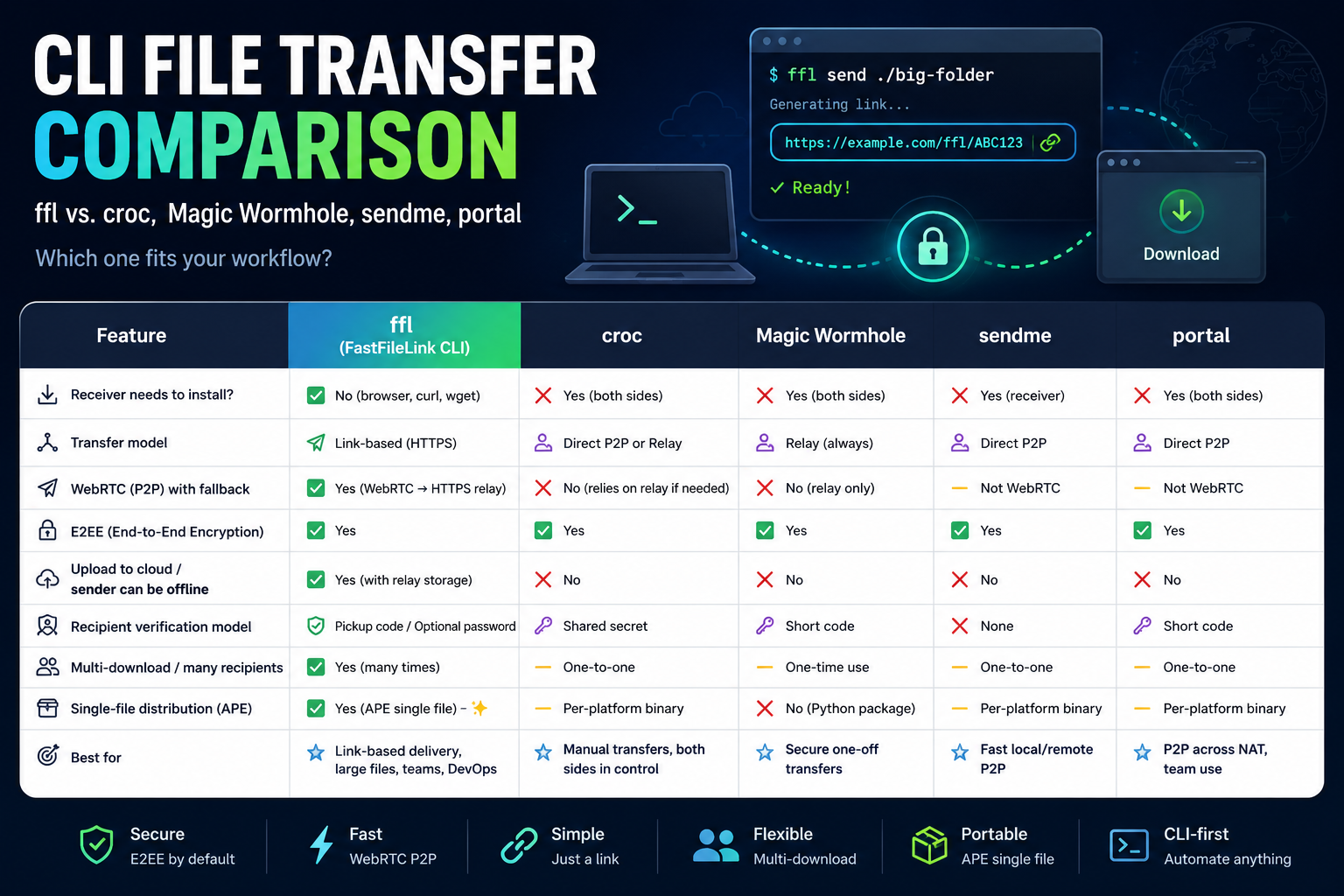
If you often move files from the terminal, you have probably heard of tools like croc, Magic Wormhole, portal, or sendme. They all solve the same basic problem: getting a file from one machine to another.
Most file transfer tools fall into two broad categories:
-
P2P transfer tools
These try to connect the sender and receiver directly. When a direct path is not available, some of them fall back to a relay. Magic Wormhole, portal, and sendme belong to this general category.crocis more relay-first, which helps avoid many NAT and firewall problems. -
Cloud-upload tools
These upload the file to a server first, then give the recipient a download link. Tools and services like transfer.sh, WeTransfer, and file.io follow this model.
In everyday use, most people are already familiar with the second category: Google Drive, Dropbox, WeTransfer, and similar services. The reason is simple: the recipient does not need to install anything. They receive a link and download the file.
CLI transfer tools have a different strength. They are fast, simple, automation-friendly, and great for temporary transfers. But many of them share one limitation: the receiver usually needs to install the same tool too.
For example, croc is very convenient, but both sides need croc. Magic Wormhole also expects both sides to participate in the same wormhole workflow. That is fine when you are moving files between your own machines. It becomes less convenient when you need to send something to a client, a teammate, a phone user, or a group of people.
So what makes ffl different?
ffl is the CLI version of FastFileLink. Its core idea is simple: from the terminal, turn files, folders, or even stdin streams into an HTTPS download link that anyone can open.
The main difference: ffl gives the receiver an HTTPS link
The mental model of ffl looks like this:
The recipient does not need to install ffl first. If they have a browser, they can download the file. If they are on a server, they can use curl or wget. This changes the shape of the whole transfer flow.
Most CLI transfer tools are built around a paired session:
ffl is closer to creating a reusable delivery point:
That is why ffl naturally fits one-to-many delivery, repeated downloads, and resumable downloads. It is useful for “send this from one of my machines to another,” and it is also built for “deliver this file to someone else.”
Quick comparison
✅ Supported / suitable ❌ Not supported / not suitable ➖ Depends, or not the main workflow
| Key point | ffl | croc | Magic Wormhole | sendme | transfer.sh / WeTransfer |
|---|---|---|---|---|---|
| Receiver needs to install a tool | ✅ No, browser is enough | ❌ Yes | ❌ Yes | ❌ Yes | ✅ No |
Download with curl / wget |
✅ Yes | ❌ No | ❌ No | ❌ No | ✅ Yes |
| Main handoff model | ✅ HTTPS link | 🔑 Code phrase | 🔑 Code phrase | 🎫 Ticket / CLI | ☁️ Cloud link |
| One-to-many delivery | ✅ Natural | ❌ Not suitable | ❌ Not suitable | ❌ Not suitable | ✅ Yes |
| Repeated downloads from the same share | ✅ Yes | ➖ Not the main model | ➖ Not the main model | ➖ Not the main model | ✅ Yes |
| Direct P2P | ✅ WebRTC P2P | ➖ Mostly relay-based | ➖ Can try direct paths | ✅ Yes | ❌ No |
| Fallback when direct fails | ✅ HTTPS relay / tunnel | ✅ Relay | ✅ Transit relay | ✅ Relay | ➖ Already cloud-hosted |
| Relay impact on speed | ✅ Direct path avoids an extra hop; fallback only when needed | ➖ Often depends on relay location and bandwidth | ➖ Depends on the path | ✅ Good when direct works | ➖ Depends on the cloud service and region |
| E2EE | ✅ Supported | ✅ Supported | ✅ Supported | ✅ Transport encryption / protocol integrity | ➖ Depends on the service |
| Recipient verification model | ✅ OTP / PubKey / Basic Auth, etc. | 🔑 The code is the pairing mechanism | 🔑 Wormhole code | 🎫 Ticket | ➖ Mostly link or account permissions |
| Cloud upload / sender can go offline | ✅ Supported with upload mode | ❌ No | ❌ No | ❌ No | ✅ Main workflow |
| Resume interrupted downloads | ✅ Yes | ✅ Yes | ➖ Depends | ✅ Yes | ➖ Depends on the service |
| Folder transfer | ✅ Yes | ✅ Yes | ✅ Yes | ✅ Yes | ➖ Usually needs zipping first |
| Distribution model | ✅ APE single file + native builds | ✅ Go binary per platform | ➖ Python package / OS package | ✅ Rust, installed per platform | ✅ Web service |
Why WebRTC matters for speed and routing
ffl tries WebRTC P2P by default. When a direct path works, data flows from the sender to the receiver without going through a relay. For large files, avoiding an extra hop can make a real difference.
When P2P is not available, ffl automatically falls back to HTTPS relay / tunnel mode. The transfer can still continue instead of failing because of NAT or firewall restrictions. If the recipient uses a browser or curl, they use the HTTPS path. If the recipient also uses ffl, it can try WebRTC first.
croc leans more toward a relay-first design. That makes it very good at getting through NAT, but transfer speed can depend heavily on the relay’s location, bandwidth, and route. When you are moving large files across countries, corporate networks, or cloud regions, that difference can matter.
Tools like sendme also have strong modern P2P capabilities. The main difference is still on the receiver side: the recipient needs the matching tool or ticket workflow, while ffl can simply hand out a standard HTTPS download link.
Where tools like croc shine
croc has a very clear strength: once both devices have it installed, you can pair them with a code and move a file quickly. For engineers, it is great for sending something from a laptop to a remote host, from a work machine to a home machine, or between two machines you control.
Magic Wormhole has a similar appeal. Its code phrase is easy to communicate verbally, and its security model is mature. It works well when both sides are comfortable using the same CLI workflow.
The sweet spot for these tools is:
If that is your situation, croc and Magic Wormhole are excellent tools.
Where ffl fits better
ffl is more useful when the situation looks like this:
In these cases, the HTTPS link is the key advantage.
You do not need to check whether the recipient installed the right tool. You do not need to explain a code phrase flow. You send a link. The recipient can be on a browser, a phone, a server, or a CI job, and there is still a natural way to receive the file.
How it differs from cloud-upload tools
Services like transfer.sh, WeTransfer, and file.io also give you download links. Their usual flow is:
That is convenient, but it also means the file is stored on a service first. Large files have to finish uploading before the recipient can download them. Privacy, retention, and availability depend on the service provider.
ffl gives you more flexibility. It can try WebRTC P2P first, then fall back when needed. If the sender needs to go offline, upload mode can turn it into a temporary hosted delivery link.
That covers two common workflows:
With E2EE enabled, the relay or temporary storage server cannot read the file contents.
APE: why portable single-file distribution matters
Besides native builds, ffl also provides an APE version. APE stands for Actually Portable Executable, from the Cosmopolitan ecosystem. In plain terms, it is a single executable format designed to run across multiple operating systems whenever possible.
This is different from the usual Go or Rust single-binary story. Go and Rust tools often produce one executable per target platform:
The APE experience is closer to this:
That is useful for DevOps work, emergency debugging, customer environments, containers, and machines where you do not have permission to install packages. You do not need a package manager, and you do not need to set up a runtime on the target machine.
APE also makes ffl unusually convenient as an embeddable transfer engine. The official Android app and the MCP Server both use the APE build as the core engine. The outer application handles the phone, AI agent, or server integration, while the same ffl.com engine handles transfer.
Practical DevOps scenarios where ffl feels different
1. Pull a result out of a container
You run a task inside a container and it produces a report, model, log bundle, or test artifact. The usual options may involve mounting a volume, setting up SCP, fixing permissions, or uploading to cloud storage first.
With ffl, you can run:
It prints an HTTPS link. You can open it from your browser or download it from another machine with curl. The more temporary the container environment is, the more useful this becomes.
2. Stream a MySQL backup directly to someone or another machine
Database backups often create huge .sql files. You may not want to write the file locally first and then upload it somewhere.
You can stream directly into ffl:
The recipient can download it from a browser, or receive it from another machine with ffl or curl. This is also useful when the output is part of a larger pipeline.
3. Share a large CI artifact with a reviewer
Some build artifacts are too large or too temporary to put into GitHub Actions artifacts, S3, or an internal file service. Examples include debug builds, benchmark results, model weights, and compressed log bundles.
From a CI runner or temporary build server:
Then send the link to the reviewer. They open it in a browser. They do not need to know anything about the CI runner.
4. Move files from locked-down machines
Production machines and customer environments often do not allow installing extra packages. They may not have Python, Node, or a convenient package manager.
A portable ffl.com binary is useful here. You can keep it in an internal tools directory, on a USB drive, on a jump box, or fetch it temporarily. Run it when needed, delete it when done.
5. Send technical files to non-engineers
This happens more often than people expect. You may need to send logs, videos, datasets, model outputs, design assets, or diagnostic bundles to a PM, customer, QA person, or external partner.
With croc, the other person also needs croc. With cloud drives, you may need to upload first, set permissions, and wait for sync.
With ffl, you send an HTTPS link. They download it from a browser. That is the simplest value proposition.
Which one should you choose?
If you are moving files between two machines you control, and both sides can install a CLI tool, croc, Magic Wormhole, and sendme are all mature choices.
If you are sending files to general users, clients, teammates, or multiple recipients, ffl feels more natural because the receiver gets a normal download link.
If your only goal is to upload a file to the cloud and let someone download it later, tools like transfer.sh and WeTransfer can do the job. They simply do not provide the same P2P-first path or the same portable CLI delivery-engine model.
Summary
The shortest way to describe ffl is:
It turns CLI file transfer into HTTPS link delivery.
That gives it a clear distinction from paired one-to-one tools like croc and Magic Wormhole. The receiver does not need to install anything. The same link can be downloaded by multiple people. The file can be received with a browser, curl, wget, or ffl.
With WebRTC P2P, relay fallback, E2EE, upload mode, and portable APE distribution, ffl works both as a daily CLI tool and as a practical file-delivery building block for automation.
For a more detailed feature-by-feature breakdown, see the Wiki detailed comparison.
Want to try it? Download the CLI version.